


eMonitor vs Insightful (Formerly WorkPuls) 2026: Full Comparison
eMonitor vs Insightful is one of the most common comparisons teams face when evaluating employee monitoring software in 2026. Insightful, formerly known as WorkPuls before its 2021 rebrand, positions itself as a workforce analytics platform. eMonitor is an employee monitoring and productivity platform that combines real-time monitoring with workforce intelligence. Both tools track employee activity, but their approaches, depth of features, and pricing differ significantly. This guide compares every major category so you can make an informed decision.
eMonitor vs Insightful: Quick Comparison Table
Before we examine each feature in detail, here is a side-by-side snapshot of where each platform stands in April 2026. This table covers pricing, core capabilities, and platform support.
| Criteria | eMonitor | Insightful |
|---|---|---|
| Founded as | eMonitor (by TimeChamp) | WorkPuls (rebranded to Insightful in 2021) |
| Best for | Comprehensive monitoring + productivity analytics | Workforce analytics + productivity scoring |
| Starting price | $3.90/user/mo (Starter) | $6.40/user/mo (Productivity Management) |
| Mid-tier price | $6.90/user/mo (Professional) | ~$12/user/mo (Workforce Analytics) |
| Free trial | 7-day trial, full features, no credit card | 7-day trial, limited features |
| Screen monitoring | ✓ (Professional+) | Screenshots on base; recording on enterprise only |
| Screen recording | ✓ (Professional+) | Enterprise tier only |
| Real-time alerts | ✓ (customizable) | Limited alert rules |
| DLP / USB monitoring | ✓ (Professional+) | ✗ |
| Keystroke intensity | ✓ | ✗ |
| Time tracking | ✓ (automatic + manual) | ✓ (automatic only) |
| Attendance / shifts | ✓ | Basic attendance only |
| Project management | ✓ (Kanban, budgets) | ✗ |
| AI productivity insights | Productivity scoring + heatmaps | AI coaching + benchmarks |
| Platforms | Windows, macOS, Linux, Chromebook | Windows, macOS (limited) |
| Capterra rating | 4.8/5 (57 reviews) | 4.7/5 (90+ reviews) |
| Deployment | Cloud + on-premise option | Cloud only |
The table reveals a pattern: Insightful leads in analytics-first features like AI coaching, while eMonitor covers more ground on active monitoring, DLP, and operational workforce management. Pricing differences compound at scale, which we will quantify in the pricing section below.
What Happened to WorkPuls? The Insightful Rebrand Explained
Insightful launched in 2015 as WorkPuls, a straightforward employee time tracking and screenshot tool based in Serbia. In 2021, the company rebranded to Insightful to signal a shift from basic monitoring toward workforce analytics and productivity intelligence. The rebrand coincided with a Series A funding round and a move toward enterprise sales.
What changed with the rebrand? The core monitoring agent remained similar, but Insightful layered on productivity scoring algorithms, benchmarking dashboards, and AI-driven coaching recommendations. The company also restructured its pricing tiers, moving many features that WorkPuls offered on lower plans into premium and enterprise tiers.
For teams that used WorkPuls before 2021, the practical impact was a price increase paired with new analytics capabilities. Some former WorkPuls customers found the value proposition improved; others felt they were paying more for features they did not need. According to G2 reviews, approximately 15% of Insightful reviews between 2022 and 2025 mention pricing concerns related to the tier restructuring (Source: G2, Insightful reviews analysis, 2025).
Understanding this history matters because it explains Insightful's current product positioning. The tool straddles two identities: the monitoring roots of WorkPuls and the analytics aspirations of the Insightful rebrand. This duality affects feature depth, pricing logic, and where the product excels versus where it falls short.
eMonitor vs Alternatives, This Week
Capability score
Coverage
▲ Full feature parity at roughly half the cost of alternatives.
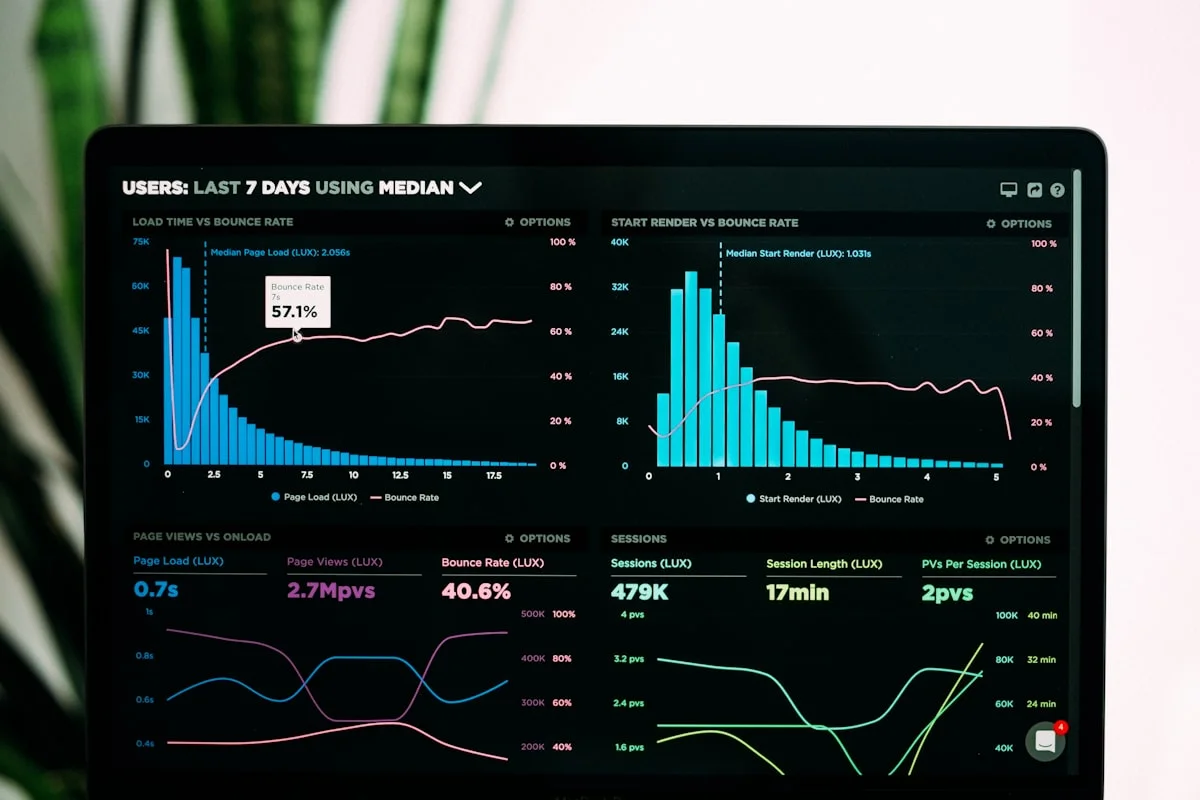
Illustrative eMonitor dashboard.
eMonitor vs Insightful: Feature-by-Feature Breakdown
A comparison table provides an overview, but the real differences between eMonitor and Insightful become clear when you examine each feature category in detail. Below, we analyze eight core areas with honest verdicts for each.
1. Activity Monitoring and App Tracking
Insightful tracks application and website usage automatically, categorizing each app as productive, unproductive, or neutral. The platform provides time-spent breakdowns per application and generates daily productivity scores per employee. Insightful's categorization engine uses machine-learning suggestions to help administrators classify new applications faster. On the Workforce Analytics tier, Insightful adds team-level benchmarks that compare individual productivity against department averages.
eMonitor provides the same core app and website tracking with time-spent breakdowns, but adds several layers that Insightful does not include. eMonitor's productivity monitoring includes visual heatmaps color-coded by productive, idle, and active time; activity intensity graphs based on keystroke and mouse patterns; timeline views showing hour-by-hour breakdowns; and attrition risk insights that detect early disengagement signals. These additional data layers give managers both the "what" and the "why" behind productivity numbers.
Verdict: eMonitor. Both platforms handle basic app tracking well, but eMonitor provides deeper behavioral data (keystroke intensity, heatmaps, attrition signals) that Insightful reserves for enterprise tiers or does not offer.
2. Screen Monitoring and Recording
Insightful includes periodic screenshots on its Productivity Management plan ($6.40/user), but continuous screen recording is restricted to the Enterprise tier with custom pricing. Screenshot frequency is configurable, and managers can review captures in a timeline interface. On macOS, screenshot quality and feature consistency lag behind the Windows experience, a common complaint in user reviews.
eMonitor includes both automated screenshots and continuous screen recording with anomaly detection on the Professional plan at $6.90/user/month. The anomaly detection feature triggers recording automatically when unusual activity spikes occur, reducing storage needs while capturing critical moments. eMonitor also supports live screen viewing (Office TV), multi-monitor capture, screenshot blur for sensitive content, and consistent functionality across Windows, macOS, Linux, and Chromebook.
Verdict: eMonitor. Insightful gates screen recording behind enterprise pricing. eMonitor includes full screen monitoring, live viewing, and anomaly-triggered recording at a fraction of the cost, with better cross-platform support.
3. Time Tracking and Attendance
Insightful tracks employee work time automatically based on computer activity. The system records active versus idle time and generates basic attendance reports. However, Insightful does not support manual clock-in/out, shift scheduling, break tracking with configurable rules, or overtime calculations. Its time tracking serves the analytics engine rather than functioning as a standalone workforce time management system.
eMonitor provides comprehensive time tracking with automatic capture, manual clock-in/out, break scheduling with reminders, overtime calculations, and payroll-ready timesheet exports. The attendance tracking module adds shift scheduling with timezone awareness, late login alerts, GPS-based attendance for field teams, and real-time dashboards showing present, absent, and on-leave status at a glance.
Verdict: eMonitor. Insightful tracks time passively for analytics; eMonitor manages time actively for payroll, scheduling, compliance, and analytics combined. The gap is wide here.
4. Productivity Analytics and AI Insights
Insightful leads in this category. The Workforce Analytics tier includes AI-powered coaching recommendations, team efficiency benchmarks, focus time analysis, and workload distribution insights. Insightful's AI engine analyzes patterns across the organization and suggests specific actions to improve team performance. The coaching feature provides personalized tips for individual employees based on their activity patterns. For organizations whose primary goal is analytical insight rather than active monitoring, Insightful's analytics are more polished.
eMonitor provides productivity scoring, app classification (productive/non-productive/neutral), visual heatmaps, activity intensity analysis, and team-versus-individual comparisons. eMonitor does not currently offer AI-generated coaching recommendations or organizational benchmarking at the level Insightful does. However, eMonitor's productivity data is paired with deeper monitoring inputs (screen captures, keystroke intensity, detailed activity logs), giving managers richer raw data to draw their own conclusions.
Verdict: Insightful. If AI-driven analytics and automated coaching are your primary purchasing criteria, Insightful's analytics engine is more mature. If you prefer raw monitoring depth with manual analysis, eMonitor's data richness compensates.
5. Data Loss Prevention (DLP)
Insightful does not include DLP features. There is no USB monitoring, no file transfer tracking, no upload/download violation alerts, and no website access violation logging. For organizations in regulated industries (finance, healthcare, legal) where data exfiltration risk is a real concern, this is a significant gap.
eMonitor includes a full DLP module with USB insertion monitoring and blocking, file activity tracking (creation, modification, deletion with paths and timestamps), website access violation logging, upload/download violation alerts, and suspicious activity detection with repeat-violation alerts. DLP features are available on the Professional plan at $6.90/user/month.
Verdict: eMonitor wins by default. Insightful does not compete in this category. If data protection is a requirement, Insightful requires pairing with a separate DLP tool, adding cost and complexity.
6. Project and Task Management
Insightful allows basic project labeling for time allocation, but does not include a dedicated project management module. There are no Kanban boards, no task assignment workflows, no budget tracking, and no client billing features. Teams using Insightful typically pair it with a separate project management tool like Asana, Jira, or Monday.com.
eMonitor includes built-in project management with centralized project planning, task assignment with priorities and timelines, Kanban boards, budget tracking by hours or cost, and integrated client management. For agencies and professional services firms that need time tracking tied directly to project billing, eMonitor eliminates the need for a separate tool.
Verdict: eMonitor. Insightful's project features are superficial. eMonitor replaces standalone project management tools for teams that need monitoring plus task coordination in one platform.
7. Alerts and Notifications
Insightful offers basic alerting for productivity drops and idle time thresholds. Alert customization is limited on standard plans, and real-time notification options are restricted compared to enterprise-tier configurations. Alerts focus primarily on productivity metrics rather than security or compliance events.
eMonitor provides extensive real-time alerts covering incomplete work hours, late logins, idle time, productivity drops, unauthorized app usage, burnout risk indicators, sensitive file access, USB connections, and geofencing violations. Every alert type is individually configurable with custom thresholds per team, department, or individual employee.
Verdict: eMonitor. The breadth and configurability of eMonitor's alerting system surpasses Insightful's productivity-focused notifications by a wide margin.
8. Platform Support and Deployment
Insightful supports Windows and macOS, but macOS functionality is limited. Several features, including advanced screen recording and certain analytics capabilities, work differently (or not at all) on macOS. Insightful is cloud-only with no on-premise deployment option. Linux and Chromebook are not supported.
eMonitor supports Windows, macOS, Linux, and Chromebook (beta) with consistent feature parity across platforms. Cloud deployment is standard, and on-premise installation is available for organizations that require it. Consistent cross-platform behavior matters for organizations running mixed OS environments, which a 2024 Gartner survey found applies to 62% of companies with 100+ employees (Source: Gartner, Digital Workplace Survey, 2024).
Verdict: eMonitor. Broader platform support, more consistent feature parity, and on-premise availability give eMonitor a clear advantage for diverse IT environments.
Pricing Comparison: eMonitor vs Insightful at Every Team Size
Pricing is where the eMonitor vs Insightful comparison becomes most concrete. Both platforms use per-user monthly pricing with annual billing discounts, but the cost structures diverge significantly, especially when you factor in which features each price tier actually includes.
Tier-by-Tier Pricing Breakdown
| Plan | eMonitor | Insightful |
|---|---|---|
| Entry tier | Starter: $3.90/user/mo | Productivity Management: $6.40/user/mo |
| Mid tier | Professional: $6.90/user/mo | Workforce Analytics: ~$12/user/mo |
| Enterprise | Enterprise: $13.90/user/mo | Enterprise: custom quote |

Annual Cost at Common Team Sizes
The per-user price gap compounds dramatically as teams grow. Here is what each platform costs annually (billed annually) at common team sizes, comparing eMonitor Professional ($6.90/user) against Insightful Workforce Analytics (~$12/user), which are the closest feature-equivalent tiers.
| Team Size | eMonitor Professional (annual) | Insightful Workforce Analytics (annual) | Annual Savings with eMonitor |
|---|---|---|---|
| 25 users | $2,070 | $3,600 | $1,530 |
| 50 users | $4,140 | $7,200 | $3,060 |
| 100 users | $8,280 | $14,400 | $6,120 |
| 250 users | $20,700 | $36,000 | $15,300 |
| 500 users | $41,400 | $72,000 | $30,600 |
| 1,000 users | $82,800 | $144,000 | $61,200 |
At 100 users, choosing eMonitor over Insightful saves $6,120 per year while gaining screen recording, DLP, project management, and broader platform support. At 1,000 users, the gap exceeds $61,000 annually. These savings are recurring, compounding year over year.
A common counterargument is that Insightful's AI coaching justifies the premium. That depends entirely on your team's needs. If your organization values automated coaching recommendations and is willing to pay $5.10 more per user monthly for them, Insightful makes sense. If you need active monitoring, DLP, project management, and cross-platform support, eMonitor delivers more capability per dollar spent.
Hidden Cost Considerations
Beyond the per-user price, consider these additional cost factors when comparing eMonitor vs Insightful.
- Separate DLP tool: Insightful's lack of DLP means regulated organizations must purchase a standalone DLP solution (typically $8-15/user/month), nearly doubling the total per-user cost.
- Project management add-on: Insightful requires a separate project management tool ($5-12/user/month for Asana, Monday.com, or similar) if your team needs task coordination alongside monitoring.
- macOS limitations: Organizations with mixed Windows/macOS environments may find Insightful's macOS gaps create visibility blind spots for a portion of their workforce.
- Support tier costs: Priority support and dedicated account management on Insightful require enterprise-level contracts. eMonitor includes phone, chat, and email support across all plans.
When you account for these hidden costs, the effective per-user cost of an Insightful deployment with comparable capabilities to eMonitor's Professional plan can exceed $25 per user monthly.

See How eMonitor Compares in Your Environment
Start a 7-day free trial with full features. No credit card required. Set up takes under 2 minutes.
Deployment and Setup: eMonitor vs Insightful
How quickly can you go from purchase decision to live monitoring data? Deployment speed matters because every day without monitoring is a day without visibility into how your team works.
Insightful Deployment
Insightful uses a downloadable desktop agent for Windows and macOS. Setup involves creating an organization account, configuring teams and departments, installing the agent on each machine, and customizing productivity classifications. For small teams (under 25 users), the process typically takes 2-4 hours. Larger deployments may require IT support for mass agent deployment via group policy or SCCM. Insightful does not offer an on-premise option, so organizations with strict data sovereignty requirements must ensure their data residency policies align with Insightful's cloud infrastructure.
eMonitor Deployment
eMonitor follows a similar agent-based approach but supports four operating systems (Windows, macOS, Linux, Chromebook) and offers both cloud and on-premise deployment. The lightweight agent installs in under two minutes per machine, and mass deployment is supported through MSI packages for Windows group policy distribution. eMonitor's onboarding team provides hands-on setup assistance for teams of 20 or more, including app classification configuration and custom alert rules.
A 2024 Capterra survey found that 73% of organizations consider deployment complexity a top-3 factor when selecting employee monitoring software (Source: Capterra Buyer Behavior Survey, 2024). Both platforms handle deployment reasonably well for cloud setups, but eMonitor's broader OS support and on-premise option give it an edge for IT-complex environments.
Migration from Insightful (or WorkPuls) to eMonitor
If you are currently using Insightful and considering a switch, the migration process is straightforward. Install eMonitor's agent alongside the Insightful agent, run both in parallel for 5-7 days to validate data consistency, then uninstall the Insightful agent. eMonitor's support team helps map your existing productivity classifications (which apps are productive, neutral, or unproductive) to eMonitor's classification engine, so your historical categorization logic carries forward.
Which Tool Fits Your Team? Use Case Recommendations
After analyzing both platforms in detail, here are specific recommendations based on team type, size, and primary objectives.
Choose Insightful If...
- Your primary goal is workforce analytics: Insightful's AI coaching, team benchmarking, and focus time analysis are best-in-class for organizations that want to understand productivity patterns without active monitoring.
- You have a Windows-only environment: Insightful performs best on Windows, and if your entire workforce uses Windows, you avoid the macOS feature parity issues.
- Budget is not a primary constraint: At $12+/user/month for full analytics, Insightful makes sense for organizations where the ROI from AI coaching justifies the premium.
- You do not need DLP, screen recording, or project management: If your monitoring goals are limited to productivity analytics and basic screenshot capture, Insightful covers those needs well.
Choose eMonitor If...
- You need comprehensive monitoring plus analytics: eMonitor covers activity tracking, screen recording, DLP, time tracking, attendance, and project management in one platform.
- You run a mixed-OS environment: Windows, macOS, Linux, and Chromebook all receive consistent features.
- Budget efficiency matters: eMonitor's Professional plan at $6.90/user includes features Insightful reserves for enterprise pricing.
- You operate in a regulated industry: DLP, file monitoring, and USB tracking are critical for finance, healthcare, and legal teams. eMonitor includes these; Insightful does not.
- You need operational workforce management: Shift scheduling, attendance tracking, overtime calculations, and payroll-ready timesheets go beyond monitoring into day-to-day workforce operations.
- You manage remote or distributed teams: eMonitor's remote team monitoring combines real-time alerts, screen captures, activity dashboards, and attendance in a single view, providing comprehensive visibility into distributed workforces.
Industry-Specific Recommendations
BPO and call centers: eMonitor. Shift scheduling, audio tracking, real-time alerts for idle agents, and attendance tracking are essential for BPO operations. Insightful lacks shift management and audio monitoring.
Software development teams: Either tool works. Insightful's analytics provide developer productivity benchmarks. eMonitor's activity tracking and project management give engineering leads both monitoring data and task coordination.
Financial services and legal: eMonitor. DLP, USB monitoring, and file tracking are non-negotiable in regulated environments. Insightful requires a separate DLP solution.
Creative agencies: eMonitor. Built-in project management, billable hour tracking, and client billing features make eMonitor a better fit for agencies billing clients by the hour.
Real-World Performance and User Reviews
Product specifications tell one story; user experience tells another. Here is what actual users report about each platform across major review sites as of Q1 2026.
Insightful User Feedback
Insightful holds a 4.7/5 rating on Capterra (90+ reviews) and a 4.4/5 on G2 (85+ reviews). Common praise includes intuitive analytics dashboards, clear productivity scoring, and helpful onboarding documentation. Common complaints mention macOS feature limitations, pricing increases since the WorkPuls rebrand, and restricted customization on lower-tier plans. A recurring theme in negative reviews is that features visible in marketing materials require enterprise contracts to access (Source: G2 and Capterra, Insightful review data, Q1 2026).
eMonitor User Feedback
eMonitor holds a 4.8/5 rating on Capterra (57 reviews) and a 4.85/5 on Software Advice (66 reviews). Users consistently highlight comprehensive feature coverage, responsive customer support, and pricing transparency. The most common improvement requests relate to mobile app monitoring capabilities and deeper third-party integrations. Notably, eMonitor reviews rarely mention hidden costs or feature gating, suggesting the pricing tiers deliver what they promise (Source: Capterra and Software Advice, eMonitor review data, Q1 2026).

What Reviews Reveal About the Comparison
The review data supports the pattern we see in feature analysis: Insightful users who prioritize analytics are satisfied, but those who expected active monitoring depth are disappointed by feature gating. eMonitor users report getting more monitoring capabilities than expected for the price, but occasionally wish for more third-party analytics integrations. For teams evaluating the eMonitor vs Insightful decision, the review data suggests reading recent reviews (2025-2026) specifically, as both products have evolved significantly since the WorkPuls era.
Privacy, Compliance, and Employee Experience
Employee monitoring software operates in a sensitive space. How each tool handles privacy, transparency, and legal compliance affects not just regulatory risk but also employee trust and adoption.
Insightful's Privacy Approach
Insightful states GDPR compliance and offers EU data residency options. The platform provides admin controls for monitoring scope (which employees, which hours, which activities) and an employee-facing dashboard showing tracked data. Insightful's marketing emphasizes "productivity intelligence" over "monitoring," aligning with a less intrusive brand positioning. However, the absence of on-premise deployment limits options for organizations with strict data sovereignty policies.
eMonitor's Privacy Approach
eMonitor operates on a work-hours-only monitoring model by default. Tracking begins only after employee clock-in and stops after clock-out, ensuring personal time remains private. The platform includes employee-visible dashboards where individuals can see exactly what data is collected about them. Screenshot blur protects sensitive information, monitoring levels are configurable per team or individual, and stealth mode versus visible mode is an administrative choice. On-premise deployment is available for organizations that require full data sovereignty.
Both platforms align with GDPR requirements, but eMonitor's work-hours-only default and on-premise option give it an edge for organizations operating under strict European privacy regulations. The Electronic Communications Privacy Act (ECPA) in the United States permits employer monitoring with appropriate notice, and both tools support disclosure-based consent workflows.
Compare Both Tools in Your Own Environment
The best comparison is one you run yourself. Try eMonitor free for 7 days with your actual team. See the data, test the features, and decide based on real experience.
Final Verdict: eMonitor vs Insightful in 2026
The eMonitor vs Insightful decision comes down to a clear distinction: Insightful is a workforce analytics platform with monitoring features; eMonitor is a comprehensive monitoring and productivity platform with workforce intelligence built in.
Insightful excels at AI-driven productivity analytics, coaching recommendations, and team benchmarking. If your sole goal is understanding workforce patterns through data, and you do not need active monitoring, DLP, or project management, Insightful delivers strong value on its premium tiers.
eMonitor excels at providing a single platform that covers monitoring, time tracking, attendance, screen recording, DLP, project management, and productivity analytics. It supports more operating systems, offers on-premise deployment, and costs 42% less than Insightful at feature-equivalent tiers. For teams that need both visibility and operational workforce management, eMonitor is the more complete and cost-effective choice.
For most organizations comparing eMonitor vs Insightful, the practical question is: do you need analytics only, or do you need analytics plus active monitoring? If the answer includes active monitoring, eMonitor provides more depth at a better price. If analytics alone suffice, Insightful is a competent option worth its premium for the right use case.
Frequently Asked Questions: eMonitor vs Insightful
Is Insightful better than eMonitor?
Insightful offers stronger AI-driven coaching and benchmarking analytics. eMonitor provides deeper active monitoring, DLP, project management, and broader platform support at a lower price. The better choice depends on whether you prioritize analytics-only or comprehensive monitoring with analytics combined.
What happened to WorkPuls?
WorkPuls rebranded to Insightful in 2021 to shift its positioning from basic time tracking toward workforce analytics and productivity intelligence. The core monitoring agent remained similar, but the company added AI-driven insights, restructured pricing tiers, and moved several features into higher-priced plans.
How much does Insightful cost?
Insightful starts at $6.40 per user per month for the Productivity Management plan. The Workforce Analytics tier costs approximately $12 per user monthly. Enterprise pricing requires a custom quote. eMonitor's comparable Professional plan costs $6.90 per user monthly with more features included.
Is Insightful good for 1,000+ employees?
Insightful supports large deployments, but costs escalate quickly. At 1,000 users on the Workforce Analytics plan, Insightful costs approximately $144,000 per year. eMonitor Professional covers the same team for $82,800 annually, saving over $61,000 with comparable or deeper monitoring features.
Does eMonitor offer workforce analytics like Insightful?
eMonitor provides productivity scoring, app and website analytics, visual heatmaps, idle detection, and team comparisons. Insightful adds AI coaching suggestions on premium tiers. Both platforms deliver actionable workforce data, but eMonitor bundles analytics with deeper active monitoring at a lower per-user price.
Can I switch from Insightful to eMonitor easily?
eMonitor migration from Insightful typically completes in one business day. Install eMonitor's agent, configure productivity classifications, and optionally run both tools in parallel for a comparison week. eMonitor's onboarding team provides free migration assistance for teams of 20 or more users.
Does Insightful have screen recording?
Insightful offers screen recording only on its Enterprise and Workforce Analytics tiers. The base plan includes periodic screenshots but not continuous recording. eMonitor includes both screenshots and screen recording with anomaly-triggered capture on its Professional plan at $6.90 per user monthly.
Which tool is better for remote team monitoring?
eMonitor provides more comprehensive remote monitoring with real-time dashboards, screen captures, idle detection, attendance tracking, and configurable alerts in one platform. Insightful focuses on asynchronous analytics. For real-time visibility into distributed teams, eMonitor offers broader, lower-cost coverage.
Does Insightful include DLP or data loss prevention?
Insightful does not include DLP features such as USB monitoring, file transfer tracking, or upload violation alerts. eMonitor provides a full DLP module with USB monitoring, file activity tracking, violation logging, and real-time suspicious transfer alerts on its Professional and Enterprise plans.
What platforms does eMonitor support compared to Insightful?
eMonitor supports Windows, macOS, Linux, and Chromebook (beta) with consistent feature parity. Insightful supports Windows and macOS, but several advanced features are limited on macOS. Neither platform currently offers a mobile monitoring agent for iOS or Android.
Is Insightful GDPR compliant?
Insightful states GDPR compliance with EU data residency options. eMonitor also maintains GDPR compliance with configurable privacy levels, employee-visible dashboards, and on-premise deployment for organizations requiring full data sovereignty. Both platforms support administrator-controlled monitoring scopes.
How do eMonitor and Insightful compare on customer support?
eMonitor provides email, chat, and phone support across all plans with dedicated onboarding for teams of 20-plus users. Insightful offers email support on standard plans and reserves priority support for enterprise contracts. eMonitor support responses average under 4 hours on business days.
Sources
- G2, Insightful Reviews Analysis, 2025
- Capterra, eMonitor and Insightful Review Data, Q1 2026
- Software Advice, eMonitor Review Data, Q1 2026
- Gartner, Digital Workplace Survey, 2024
- Capterra, Buyer Behavior Survey, 2024
- Insightful official pricing page, accessed April 2026
- eMonitor official pricing page, accessed April 2026
Ready to See eMonitor in Action?
1,000+ companies trust eMonitor for employee monitoring and productivity. Start your free 7-day trial today, or book a personalized demo with our team.